Webhooks
Stream the committed transaction log to your own systems as signed events.
Ablo keeps an ordered transaction log of every committed change and coordinates the writers — agents, and the people alongside them — that produce it. Your rows live in your own database; Ablo holds only the log. Webhooks stream that log to your systems as signed events: every committed change is POSTed to an endpoint in your app, and your handler decides what to do with it.
You call Ablo to make changes through the client, and Ablo calls your webhook
with each committed change. Webhooks are the
push way to keep a store in step with the log — your own database, a warehouse,
a search index, a background job. The direct alternative is ablo connect,
where Ablo reads your write-ahead log and writes back through a scoped role. Either
way your handler owns the write: the webhook path gives Ablo no database
credentials at all.
The loop
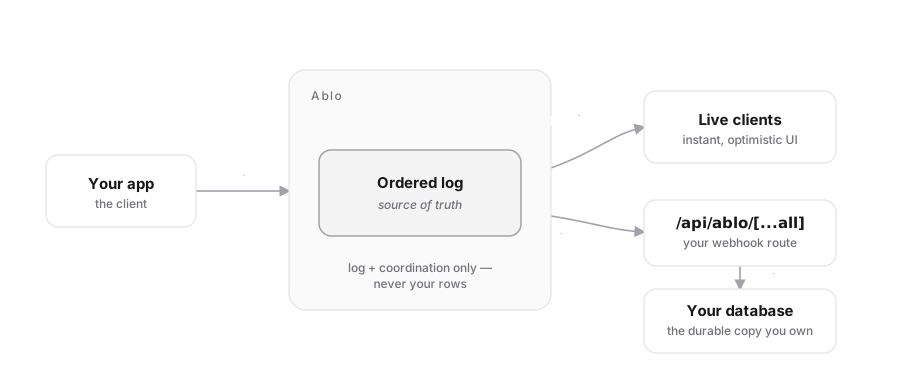
There are two ways data flows out of Ablo, and they’re for different jobs:
| reaches | use it for | |
|---|---|---|
Realtime (useAblo, WSS) |
your live UI | instant, optimistic rendering |
| Webhooks (this page) | your database | a durable copy you own: analytics, backups, server logic |
Most apps use both: the realtime stream for the UI, the webhook stream to keep their database in sync. This page is the webhook stream.
Every event carries syncId, a monotonic log position, so you can both dedupe
and apply in order. Ablo guarantees the order because it owns the log.
The event object
Every delivery is a batch of events. Each event:
| field | meaning |
|---|---|
type |
"<model>.<verb>" with the model name lowercased, e.g. record.updated |
model |
the model name exactly as declared in your schema: the table to write |
objectId |
the changed row’s id |
data |
the post-change row, or null on delete |
syncId |
monotonic log position: dedupe and order by this |
id |
String(syncId): the event id |
createdAt |
ISO commit timestamp |
import type { AbloWebhookEvent } from '@abloatai/ablo/webhooks';1. Create a handler
npx ablo init scaffolds this for you at app/api/ablo/[...all]/route.ts. If
your project uses Prisma it’s a working generic mirror — one upsert/delete
for every model, no per-model code. Otherwise it’s a neutral route with a single
place to plug your database in.
import { Webhook } from 'svix'; // any Standard Webhooks library
import type { AbloWebhookEvent } from '@abloatai/ablo/webhooks';
import { PrismaClient } from '@prisma/client';

const wh = new Webhook(process.env.ABLO_WEBHOOK_SECRET!);
const prisma = new PrismaClient();

type ModelDelegate = {
  upsert(a: { where: { id: string }; create: Record<string, unknown>; update: Record<string, unknown> }): Promise<unknown>;
  delete(a: { where: { id: string } }): Promise<unknown>;
};

export async function POST(req: Request): Promise<Response> {
  const body = await req.text(); // RAW body — required to verify
  let batch: { data: AbloWebhookEvent[] };
  try {
    batch = wh.verify(body, Object.fromEntries(req.headers)) as { data: AbloWebhookEvent[] };
  } catch {
    return new Response('invalid signature', { status: 400 });
  }

  const delegates = prisma as unknown as Record<string, ModelDelegate | undefined>;
  for (const event of [...batch.data].sort((a, b) => a.syncId - b.syncId)) {
    const model = delegates[event.model];
    if (!model) continue; // a model you don't mirror — skip
    if (event.data === null) {
      await model.delete({ where: { id: event.objectId } }).catch(() => {});
    } else {
      await model.upsert({ where: { id: event.objectId }, create: event.data, update: event.data });
    }
  }

  return new Response(null, { status: 200 }); // 2xx = delivered
}
You only edit this if your tables diverge from Ablo’s schema (renamed
columns, extra side effects) — add a case for that model before the generic
mirror. If your tables match Ablo’s, you never touch it.
2. Test locally
npx ablo dev prepares an isolated schema branch; it does not forward webhook
deliveries. Register an HTTPS endpoint that Ablo can reach. For local handler
development, expose your app with the HTTPS tunnel your team already trusts,
then register that temporary URL and remove the endpoint when you finish.
3. Register your endpoint
For a deployed URL, register it once. Ablo mints the signing secret and returns
it a single time — the CLI writes it straight into your .env.local.
npx ablo webhooks create https://yourapp.com/api/ablo/[...all]
# ✓ Registered we_… → https://yourapp.com/api/ablo/[...all]
# ✓ Wrote ABLO_WEBHOOK_SECRET to .env.local (shown once)
Scope which models fire and label the endpoint at creation with --events and
--description (both optional; events default to * = every model):
npx ablo webhooks create https://yourapp.com/api/ablo/[...all] \
  --events record,project --description "prod mirror"
Manage and inspect endpoints:
npx ablo webhooks list          # endpoints + delivery health (status, cursor, last error)
npx ablo webhooks roll <id>     # mint a fresh signing secret
npx ablo webhooks enable <id>   # re-enable a disabled endpoint
npx ablo webhooks rm <id>       # remove an endpoint
Or call the API directly — the org is derived from your secret key:
curl https://api.abloatai.com/api/v1/webhook_endpoints \
  -H "authorization: Bearer $ABLO_API_KEY" \
  -H "content-type: application/json" \
  -d '{ "url": "https://yourapp.com/api/ablo/[...all]" }'
# → { "id": "we_…", "secret": "whsec_…", "status": "enabled", ... }
4. Verify the signature
Ablo signs every request with the Standard Webhooks
scheme (the spec Svix authored). Verify with any compatible library — svix or
standardwebhooks — using the secret from registration. Ablo ships no
verification code of its own; you use the open library.
const wh = new Webhook(process.env.ABLO_WEBHOOK_SECRET!);
const event = wh.verify(rawBody, Object.fromEntries(req.headers));
Verification checks three headers — webhook-id, webhook-timestamp,
webhook-signature — and rejects a timestamp outside a 5-minute window (replay
protection). Always verify against the raw request body.
Event delivery
Ablo delivers from a per-endpoint cursor over the log, advancing only on a
2xx. A failed delivery leaves the cursor in place, so the same events are
re-sent until they land — at-least-once, in order.
| behavior | how it works |
|---|---|
| Ordering | Every event carries syncId, a monotonic log position. Apply in syncId order: Ablo guarantees the order because it owns the log. |
| Retries | A non-2xx (or no response within the timeout) is retried with backoff: immediate, 5s, 5m, 30m, 2h, 5h, 10h, 10h: 8 attempts over ~32h. |
| Auto-disable | After the retries exhaust, the endpoint is marked disabled and delivery stops until you ablo webhooks enable <id>. |
| Replay | Nothing is lost on failure: the log is the durable buffer, and delivery resumes from the endpoint’s cursor once it’s healthy. |
Best practices
- Dedupe by
syncId. Skip anysyncIdyou’ve already stored. Delivery is at-least-once, so the same event can arrive twice after a retry. - Apply in
syncIdorder. It’s the log position; sort each batch by it. - Return
2xxfast. Acknowledge first, then do slow work asynchronously. - Subscribe to only what you need. Set
enabledEventsto the models you mirror (['*']is the default = all). - Roll secrets periodically:
ablo webhooks roll <id>mints a new secret; Standard Webhooks supports a rotation window so in-flight events still verify. - Verify the raw body. Frameworks that re-serialize JSON will break the signature — verify the bytes you received.
Event types
The verb is derived from the change:
| type | when |
|---|---|
<model>.created |
a row was inserted |
<model>.updated |
a row was updated |
<model>.deleted |
a row was deleted (data is null) |
<model>.archived |
a row was soft-archived |
<model>.unarchived |
a soft-archived row was restored |
Internal coordination changes (permissions, sync groups) carry no webhook — only your data models produce events.